Showing posts with label 'How To' Tutorials. Show all posts

How to Convert Dynamic Disk Back To Basic Disk And Why?

4 comments
   How to Convert Dynamic Disk Back To Basic Disk And Why?

What is Basic Disk?

A physical disk that contains primary partitions, extended partitions, or logical drives. Basic disks can be accessed by all versions of Windows, MS-DOS, and Windows NT. Basic disks can contain up to four primary partitions, or three primary partitions and an extended partition with multiple logical drives.

What Is Dynamic Disk?

Supported by Windows, a dynamic disk is a physical disk initialized for dynamic storage. It holds simple volumes, spanned volumes, mirrored volumes, striped volumes, and RAID-5 volumes. With a dynamic disk, you can perform disk and volume management without having to restart the operating system.


Why convert dynamic disks to basic?

Although dynamic disks contain too many advantages than basic disks, it also has some problems as below which make you have to convert dynamic disks back to basic:
1. According to Microsoft Windows users, to convert drive with Windows Vista installed from basic to dynamic disk may result in:
  • The dynamic Drive volumes could not be deleted when you try to reinstall Microsoft Windows Vista.
2. Accidentally convert basic disk to dynamic disk.
3. Some examples in the forum as follows:
  • I am having Windows Vista ultimate SP2 running on my computer & want to convert dynamic type disk to a basic one, but without formatting the computer....!  

How to convert dynamic disk to basic disk?

As we know, once you changed basic disk to dynamic disk, you cannot convert the dynamic disk back to basic disk directly without deleting the partitions and rebuilding the disk under Windows Disk Management.
How to Convert Dynamic Disk Back To Basic Disk And Why?
In this case, third-party dynamic disk convert software like EaseUS Partition Master will save a lot of trouble to safely convert dynamic disk to basic without data loss.

To change a dynamic disk back to basic disk without data loss, please follow the steps below:


Case 1: Convert dynamic disk containing simple volumes to a basic disk.

EaseUS Partition Master can change dynamic disk containing simple volumes into a basic disk directly.
1. Choose right edition of EaseUS Partition Master and install it. After that, launch EaseUS Partition Master.
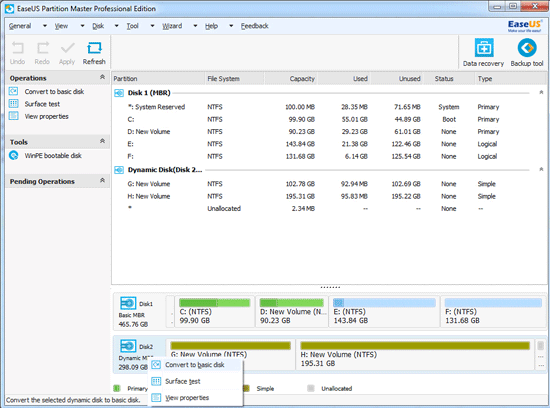
EaseUS Partition Manager
2. Select dynamic disk which you want to Convert to basic disk on the disk map, click "Disk" on the main menu and choose "Convert to basic disk" or right-click the dynamic disk and choose "Convert to basic disk".
3. After you choose "Convert to basic disk", you will see the dynamic disk has become basic disk on the disk map.
4. Click "Apply" to convert dynamic disk to basic disk. After EaseUS Partition Master applies these changes, you will see the dynamic disk has become basic disk in Windows Disk Management. And then you can use "Resize/Move partition" feature to resize partitions on the basic disk. (Tips: It is important to backup data before resizing partition, because nothing is 100% secure.)

Case 2: Convert dynamic disk containing mirrored volumes to a basic disk.

EaseUS Partition Master can change dynamic disk containing mirrored volumes into a basic one indirectly. To convert mirrored volumes, you need to break mirrored volumes by using Windows Disk Management and then convert dynamic disk to basic disk with the "Convert to basic disk" feature of EaseUS Partition Master.
1. Right click "My Computer" and choose "Manage" -> "Storage" -> "Disk Management", right click the mirrored volumes and choose "Break Mirrored Volume" to break mirrored volumes or choose "Remove Mirror" to remove the mirror. If the boot/system partition is on the mirrored volumes, you can only choose "Remove Mirror" to remove the mirror. Please backup your important data before this operation.
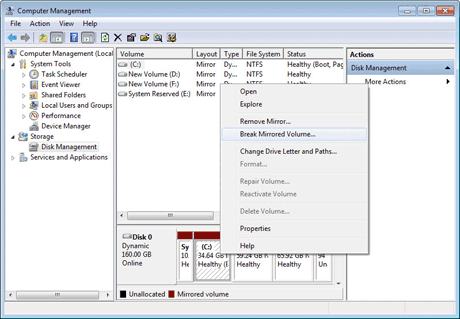
Disk Management Tool

2. After choosing "Break Mirrored Volume" or "Remove Mirror", the mirrored volumes on the dynamic disk which you want to Convert to basic disk will become simple volumes. Follow the steps in Case 1 to complete converting dynamic disk containing simple volumes to basic disk.

Download It from this link - http://www.easeus.com [Trial Version]
Cracked version with lifetime license - Click Here [Full version]

If you have any queries or any complaints don't fret to tell us in comments.

With Regards,
Rishabh

Steps to add Adsoptimal Ads into your Blogger or Wordpress Blog.

12 comments
In the previous post, I wrote about Adsoptimal.com, its pros, cons and almost everything about it, except its steps to add it to your Blogger or Wordpress blogs. 
In this post, I am telling the Steps to add Adsoptimal Ads into your Blogger or Wordpress Blog. So without wasting time lets dive into the world of TricksOverloaded.
Related Post: AdsOptimal - Best Adsense Alternative Of 2016

For Blogger

1. Log in your blogger account then go to template section.
2. On template click Edit HTML and find </head> or press ctrl+F and type <head> and search.
3. Now above </head> tag copy and paste the HEADER code from Adsoptimal.com

Steps to add Adsoptimal Ads into your Blogger or Wordpress Blog.

4. Save the template and go to Layout tab.
5. Add a new HTML/javascript  Gadget where you want to show the ads and paste the ads size code (Like <div class=”adsoptimal-slot” style=”width: 300px; height: 250px;”></div> ) and save. 

Now ads will be visible on your blog.

For WordPress

It is easier than the blogger. just download the WordPress plugin and add the ads.

Go to this link -  Plugins

If you have any query or complaint don't fret to comment below.

With Regards,
Rishabh

Revenuehits - Best Ad Network For Non-Adsense Blog

8 comments
Revenuehits - Best Ad Network For Non-Adsense Blog


Hello, friends in this article I am going to share about Revenue Hits - an ad network which is CPA and can earn you more than $100 a month. Almost every blogger has a dream to get approved by Adsense. But for small publishers, this is extremely hard aka impossible. As you know Google Adsense is best ad network but due to its approval process, many bloggers is trying to find other ad networks to earn some revenue by monetizing the contents on their blog or website. 

Revenue hits help you to earn $20-$30 per week. It is also applicable for those sites who receives less than 1000 page views per month. Unlike Adsense, small publishers can also make some dollars from a few posts. After researching a lot, my opinion settled at revenue hits. Although earning from CPC or CPM is easy but they offer low paying rates. Revenuehits is a CPA type of ad network that pays $0.50 to $5 per action. It can also pay you more but it depends on traffic from which country your site receives. 


What Is Revenue Hits?


RevenueHits is an innovative Performance Ad Network that helps publishers to generate more revenues, using a state-of-the-art contextual & Geo-targeted Ad-Serving technology. It assists publishers to monetize various online assets, including websites, add-ons, mobile sites, widgets, toolbar and much more. RevenueHits is a pure CPA (Cost Per Action).


What is CPA?


CPA means Cost-per-Action. All you get money here by only when our site readers performs an action, which means they should click the ad and install the particular software in the ad or complete the survey which shows in the ad. So it doesn’t matter if the ads on your site get 1 million or impressions a day because it’s not CPC or CPM platform. You don't get paid for this.

Some points you should know !!!

  • Since Revenuehits has the geo-targeted Ad-Serving technology, the ads will differ from a country to country. 
  • Unlike Google Adsense, there are no restrictions to keep limited no of ads overall on our site! You can place as many ads as you want in Revenuehits.
  • No matter whether your blog is Blogger blog or WordPress blog. Every website got approved instantly.
  • If your blog/site receives more traffic from the USA, then you have more chances to gain more amount of cash from Revenuehits.com.
  • You can keep your threshold payment as you like! But the minimum limit is 20$.
  • You can add as many blogs/sites(which you own) as you want in your revenue hits account and can earn from all of your blogs at a time by placing the ads in all of your blogs/sites.
  • Like Adsense accounts getting banned instantly without any prior notification, here the chances of getting Revenuehits account banned is too low!

Signing Up At Revevenuehits.com


  • First, go to this link - click here. This is a special link for fast approval and full support from revevenuehits.com.
  • Fill the mandatory details and Submit the form.
  • Verify your email account and login into revenuehits.com
Your site gets approved instantly.


Creating ads placements


Revenuehits - Best Ad Network For Non-Adsense Blog


  1. Click on Placements tab, to create ads.
  2. Choose from 'New Placements' and 'New Mobile Placements'.
  3. Choose ad format and fill the desired name for your placement.
  4. Click on </> button to get code.
  5. Place the ad code in HTML/JavaScript box of Layout Section (blogger) & Text box of widgets section (WordPress).
Ad Format

For desktop, following ad formats are available:-


  • Banner
  • 158x21 Button
  • 468x60 Footer
  • 728x90 Footer
  • Interstitial
  • Popunder
  • Shadow Box
  • Slider
  • Top Bar

For mobile, following ad formats are available:-

  • Mobile Dialog
  • Footer
  • Interstitial
  • Notifier
  • New Tab

Payment


  • Minimum payout is $20.
  • Payment method - PayPal, Payoneer and wire transfer.
  • Revenuehits Payment follows Net30 rules. Which means if you earn total $50 in this month, then you’ll get that $50 in next month ending.

Final Words

After reading this you know everything about revenuehits.com and aware of what is CPA? signup process and ads formats of revenuehits. So, without wasting time go and create an account on revenue hits and start making money per action performed by users.

Sign Up For RevenueHits.com

Revenuehits - Best Ad Network For Non-Adsense Blog

With Regards,
Rishabh 

What is Bitcoin (BTC) ? - Everything About It !!!

4 comments


Hello in this article I am going to tell you everything about Bitcoin or BTC. And after reading this article you understand what is Bitcoin? What is bitcoin mining? Where to store it? Where to buy it? and everything related to bitcoin (BTC). So, without wasting time start reading below to gain a plenty of knowledge in the case of bitcoins (BTC). And dive into the ocean of bitcoins with Tricks OverLoaded.
We start with first :


What Is Bitcoin (BTC)?


I am sure you trade goods in exchange for currencies like dollars, rupees, euros, pounds, yen, etc in everyday life. These currencies are printed on a piece of paper and you can touch it. They are controlled by authorities or banks or group of people. They guarantee us that $1 is $1. But bitcoins are bit different.
Bitcoin is a form of digital currency, generated by process called mining (I will
discuss it later in this article). And we can keep it in a bitcoin wallet. It is controlled by neither any authorities nor banks. Although It does not belong to any country. Somehow it is limited to 21 million bitcoins. Bitcoins aren’t printed, like dollars or euros – they’re produced by people, and increasingly businesses, running computers all around the world, using software that solves mathematical problems. It is first started by Satoshi Nakamoto in 2009 and till now it is a stable virtual currency.
You can spend any 1/8 part of a bitcoin. For example 0.00000001 BTC.
The system is peer-to-peer and transactions take place between users directly, without an intermediary. This means you do not have to pay taxes or any other fees which you pay to the bank earlier. Since it is not controlled by any authorities, its value is always fluctuating and now it somewhere like 1 BTC = $595. It can go high as $10,000 or low a $1.


What Is Bitcoin Mining? 


In traditional fiat money systems, governments simply print more money when they need to. But in bitcoin, money isn’t printed at all – it is discovered. Computers around the world ‘mine’ for coins by competing with each other.

The process by which new bitcoins are introduced in the market is known as mining. This process takes a lot of time, processing power and energy. Since anybody can dig bitcoins but they need one thing - a high power computer system. 

In physical currencies, there are banks that verify the money sender and receiver but in the case of bitcoins, there are no banks. So they come with mathematical problems in which miners compete against each other to be first to do it. If your system is powerful enough to solve these problems then you will get some bitcoins as a reward for discovering new bitcoins. GPUs are faster in mining than CPUs.


Bitcoin Wallets


Since bitcoin is a virtual currency so, it can only be stored in bitcoins wallets.Some well-known wallets are as following :

Online wallets


Mobile Wallets For Android


Desktop Wallets

Mobile Wallets For iOS

Final Words

After reading this I think you know everything about bitcoins and what is mining, etc. I am also going to share some other bitcoins tutorials in future. So keep Supporting and subscribing to this blog and we will keep you updated. If you have any query related to this article please state it in the comments section.

With Regards,
Rishabh

How to add Facebook like/fan page box to your blogger !!!

1 comment

Facebook Like Box : Introduction


Hello friends, today I am going to teach you how to add a Facebook fan box to your blogger. Since social media like facebook is most useful for increasing your blog's traffic.Facebook fan Page are a great way to promote your blog or website and facebook like box is widely used social plugin from Facebook developers. This facebook like box will help your visitor to become regular reader just by clicking like button. So that this box will increase the number of your facebook fans. And if you are looking for a like box for your facebook page (like this blog has an FB box on the right sidebar). This is your place, so start reading and follow everything to get a cute facebook like box. Therefore, not waste our time and dive into the ocean created by Tricks OverLoaded

Update: This is an old method, you can create a personalised facebook like box from this link -
Facebook Page Plugin. Just follow the steps listed on the link page and click on Get Code.

Facebook Like Box : Instructions

1. Firstly Login to blogger and go to Layout tab.


2. Then click on 'Add a Gadget' and select HTML/Javascript.


3. Now paste the following code in the content box and save it.

<iframe src="https://www.facebook.com/plugins/page.php?href=https%3A%2F%2Fwww.facebook.com%2Ftricksoverloaded&tabs&width=300&height=300&small_header=false&adapt_container_width=true&hide_cover=false&show_facepile=true&appId" width="300" height="300" style="border:none;overflow:hidden" scrolling="no" frameborder="0" allowTransparency="true"></iframe>

Facebook Like Box : Note

Change tricks overloaded with your facebook page username or URL.
Change height and width according to your choice (Width= min 150 to max 500) & (Height= min 70).

Final Words

Now you know how to add facebook like box to your blogger's blog and get many likes from your visitors as you can. And don't forget to like this blog's fan page and follow it. Keep supporting and keep subscribing for the latest update from this blog.

With Regards,
Rishabh

Top Ways To Earn Money Online !!!

6 comments

Top Ways To Earn Money Online !!!: Introduction:


Hello friends, In this article, I am going to tell you top ways to earn money online. If you follow all instruction told in this article, you can start making dollars by two or three months. The only thing you have to invest is your time. If you don't have patience these methods are not for you.You should own a website or a blog for better results. So start reading and don't forget to follow our blog and like our facebook page.
Now we start with :-

Top Ways To Earn Money Online !!!: Method 1:

Through Affiliate Marketing:-


(Flipkart Affiliate Program Webpage)

Many of you heard the term 'Affiliate Marketing' if you had in online money making business from some time. This is the easiest and fastest way to make money in the online market. Therefore it is in the top of the list. Almost all online selling sites like- Amazon, Flipkart, Snapdeal offers to promote their products and when anyone buys that product through your generated link, they give you the commission of about 5% to10% of total value. Just go and sign up for any of the affiliate programs.

(Amazon Affiliate Program Webpage)

Amazon can be your first choice. If your audience is from the US, you have to fill amazon.com's affiliate 
program or if your audience is from India Flipkart can be your choice. You don't need a website or blog for this, you can also share this on your facebook page or send it personally to someone.

Top Ways To Earn Money Online !!!: Method 2:

Through Cost-Per-Click websites (AdSense) :-


Almost everybody heard about 'AdSense', an ad campaign program that shows Ads on your blog or website and gives you money. AdSense is best because of its paying rates and on-time payments. It gives money in the dollar, so conversion rate is high for Indian users and an individual can make a lot of money through these. This is not 1st in this list because of the approval process of AdSense, which is neither very difficult nor a slice of cake. If your website or blog has a professional look and you write high-quality posts with visual and text of about 600+ characters. So, try it and if you are approved then have fun.

Top Ways To Earn Money Online !!!: Method 3:

Through Short Links :-

You can also make some money by shortening your links in some programs like Shorte.st and Adf.ly which shows ads if visitors click on your shortened link and gives you money. These are not reliable as above methods.So, you can give it a try for some increment to your income.

Top Ways To Earn Money Online !!!: Method Alternative:


Through Android Apps :-


You can also make some money by android apps like 'Cash Pirate' that offers you money if you download their promoted apps. You can give it a try for this.


You can make a lot of money by using all the methods explained in this article. if you enjoy then please follow this blog. Keep Supporting, Subscribing. 


What Is Rooting? And How to Root your Android Devices without PC or any Other Device with One Click For free!!!

Leave a Comment
Hello Friends, in this article we are going to discuss what is rooting? And How to Root your Android Devices without PC or any Other Device with One Click For free!!! with the fastest process.....
So start reading and don't forget to Follow this blog.......
First, we talk about :-

What Is Rooting?

Rooting is the process of allowing users of smartphonestablets and other devices running the Android mobile operating system to attain privileged or admin control (known as root access) over various Android subsystems. As Android uses the Linux kernel, rooting an Android device gives similar access to administrative (superuser) permissions as on Linux or any other Unix-like operating system such as FreeBSD or OS X.

Rooting is often performed with the goal of overcoming limitations that hardware manufacturers put on some devices. Thus, rooting gives the ability (or permission) to replace system applications and settings, run specialized applications ("apps") that require administrator-level permissions or perform other operations that are otherwise inaccessible to a normal Android user. On Android, rooting can also facilitate the complete removal and replacement of the device's operating system, usually with a more recent release of its current operating system.

Rooting is required for more advanced and potentially dangerous operations including modifying or deleting system files, removing pre-installed applications, and low-level access to the hardware itself. A secondary operation, unlocking the device's bootloader verification, is required to remove or replace the installed operating system.

Advantages

  • Support for visual changes, allowing everything to be changed from the color of the battery icon to the boot animation that appears while the device is booting, and more.
  • Full control of the kernel allows overclocking and underclocking the CPU and GPU.
  • Full application control, to remove pre-installed apps.
  • Ability to install a custom version of operating system.

Disadvantages

  • Manufacturer Warranty is not valid after rooting your device.
  • The risk of converting your device into a brick.
Note:- You can also unroot your device to get your warranty back.

How to root Your Device

Things You Need

  1. An Android Device
  2. Kingo Root For Android (app link is located below of this post)

Instructions

  1. Install 'Kingo Root For Android' in your android device you want to root.
  2. Open the app and click on 'One Click Root' to start rooting.
  3. Wait until it gets 100%.
  4. After completion, a reboot will occur (if not do it manually).
  5. After That Enjoy the Superuser access...........

ScreenShots

Download Link For Kingo Root


[Free]How to create an amazing and stunning website in few easy steps with Wix.com free of cost.

Leave a Comment
Hello friends, In this article, we are going to discuss how to create a stunning and amazing website free of cost with wix.com.....many of us think that they have to pay for creating their own website........ so start reading as you create your own website....and don't forget to follow my blog

About Wiz.com

Wix.com is a cloud-based web development platform that allows users to create HTML5 websites and mobile sites through the use of their online drag and drop tools. Users may add functionalities such as social plug-ins, e-commerce, contact forms, e-mail marketing, and community forums to their websites using a variety of Wix-developed and third-party applications.

Instructions

  1. Go to Wix.com And Click On 'Start Now' and Create Your Account.
  2. Choose your desired template you want and click on "Edit" option.
  3. Edit the site details (title and footer text), background color, and add/delete pages.
  4. When you are done, save all work.
  5. Enter your Site Name.
  6. Then, Click on 'Save' button.
  7. To make it visible by Press 'Publish' button.
  8. Use your Website And Enjoy............

Screenshots


Now you all know How to create an amazing and stunning website in few easy steps with Wix.com free of cost.so don,t forget to follow us for more stunning trick.............

                                        Click here to go to target website !!!!

How to Unlock an Android Device If You Forget Its Password or Pattern Somehow For Free [Easy]

Leave a Comment
Hi friends In this article , I am going to teach you How to Unlock an Android Device If You Forget It's Password or Pattern Somehow....... If you forget the password or pattern and not able to use your android device this is your place.....so start reading and follow each and every step carefully....


Things you need

  • Working Internet Connection.
  • A browser

Instructions

  • First, open your browser(any) and go to this link - Android Device Manager
  • Log in with the google account by which you used to log in your android device
  • Click on "Lock" option on the top left corner of the opened window 
  • Enter your new password in the desired place
  • Confirm your password
  • Save and Enjoy......

Note

  • "Android Device Manager" must be enabled in your locked device.
  • The device must be connected to the Internet.
  • You can Also Use ADM To Erase or Ring Your Device.

            
Note - Android Device Manager is automatically enabled if you do not disable it manually. 

Screenshots   


Now follow all steps above described in the instructions and don't forget to follow my blog. For more support tell me in the comments. The link is in step.


How To Recover Permanently Deleted Files And Important Document That You Had Erased For Free

Leave a Comment
Hello friends, now I am going to teach you how to Recover Permanently Deleted Files and Important Document That You Had Erased for Free [SOLVED]  ..... So start reading and if you like and want more tricks and tutorial videos follow my blog..................

About

Accidentally deleted an important file? Lost files after a computer crash? No problem - Recuva recovers files from your Windows computer, recycle bin, digital camera card, or MP3 player!

How It Works!


Windows uses the Master File Table (MFT) as an index to the files it stores on your hard drives. As we mentioned before, when you delete a file, it's faster for Windows to mark its MFT entry as 'deleted' than for Windows to overwrite the file itself, so the file is left on the hard drive.

Topic You Need To Care

  1. Stop writing on the disk from which you want to recover.
  2. Download the software from below and install it.
  3. Run and follow the on-screen steps in the recovery wizard.
  4. Recover and enjoy...........


Screenshots


Download Link


Direct Download-  DOWNLOAD

Now you all know How to Recover Permanently Deleted Files and Important Document That You Had Erased For Free so keep supporting and start following our blog.............